
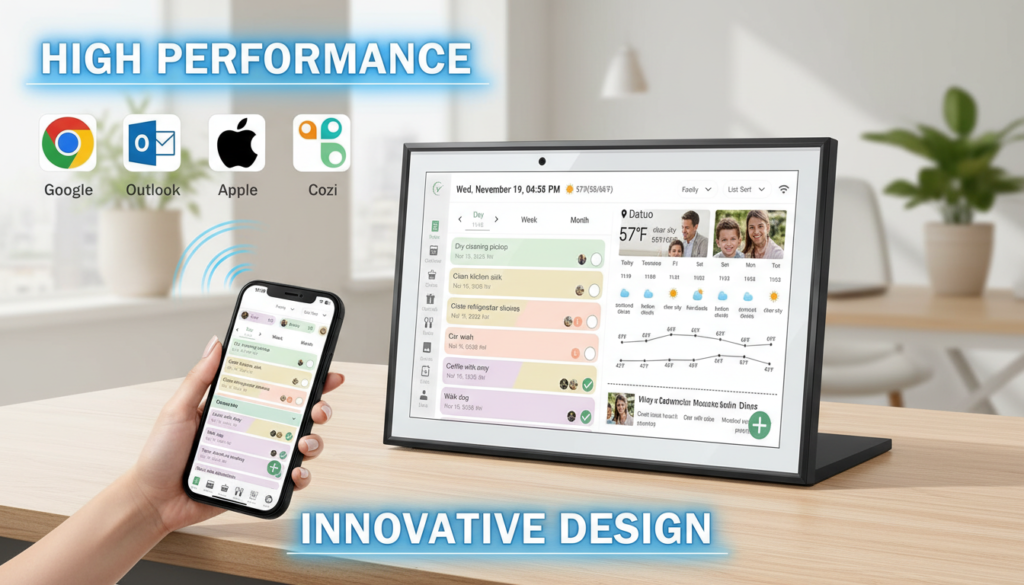
Are you tired of missed appointments, forgotten chores, and the chaos of coordinating family schedules? The RROSKY WiFi Digital Calendar might just be the game-changing solution your household needs. In today’s fast-paced world, keeping everyone on the same page feels like herding cats—but what if technology could transform your family’s organization from stressful to seamless?
I’ve spent the last six weeks testing the RROSKY WiFi Digital Calendar in my own busy household of four, and I’m excited to share how this smart touchscreen display has revolutionized the way we manage our daily lives. As a professional blogger who specializes in smart home technology and family organization solutions, I’ve reviewed dozens of digital planning tools. This 10.1-inch interactive display stands out for its comprehensive approach to family management, combining scheduling, chore tracking, meal planning, and even achievement rewards in one elegant package.
Whether you’re a overwhelmed parent juggling multiple kids’ activities, a busy professional seeking better work-life balance, or simply someone who wants to bring their home organization into the 21st century, this detailed review will help you determine if the RROSKY WiFi Digital Calendar deserves a place in your home. Let’s dive into the seven best ways this smart family planner can transform your household organization.
Table of Contents
Who Is the RROSKY WiFi Digital Calendar For?
The RROSKY WiFi Digital Calendar is specifically designed for modern families and households seeking a centralized, tech-savvy solution to daily organization challenges. This product shines brightest for:
Ideal Users:
- Busy families with children who need to coordinate multiple schedules, school activities, sports practices, and appointments
- Working parents struggling to balance professional commitments with family responsibilities
- Multi-generational households where everyone needs access to shared information
- Tech-forward individuals who appreciate smart home integration and cloud-based solutions
- Households transitioning from paper planners to digital organization systems
- Families focused on building positive habits through chore charts and reward systems
- Anyone seeking to reduce mental load by externalizing family management tasks
Who Might Look Elsewhere:
- Individuals living alone who only need personal calendar management (a smartphone might suffice)
- Families preferring traditional paper planning methods
- Those with extremely limited budgets seeking the most basic calendar functionality
- Households without reliable WiFi connectivity
- Users uncomfortable with cloud-based photo storage and smart technology
The RROSKY WiFi Digital Calendar truly excels when multiple family members need to stay synchronized, making it an invaluable tool for the coordination-challenged household.
Product Overview & Summary Box
Product Information
| Item Details | Value |
|---|---|
| Brand Name | RROSKY |
| Manufacturer | RROSKY |
| UPC | 768152095953, 768152095878 |
| Best Sellers Rank |
#6,050 in Office Products #2 in Desk Calendar Bases |
| Customer Reviews | ⭐ 4.4 / 5 (189 ratings) |
| Size | 10.1 inch |
Standout Features at a Glance:
✅ All-in-one family organization hub
✅ AI-powered meal planning assistance
✅ Customizable chore charts with achievement tracking
✅ Cloud photo display functionality
✅ Intuitive touchscreen interface
✅ Multiple user profiles
✅ Desk base included for flexible placement
In-Depth Review: 7 Best Ways the RROSKY WiFi Digital Calendar Organizes Your Home
1. Centralized Family Scheduling That Actually Works
The first and most obvious way the RROSKY WiFi Digital Calendar transforms home organization is through its powerful centralized scheduling system. Unlike the best digital calendar for family options that require everyone to check their phones, this smart touchscreen display serves as a communal information hub that’s always visible and accessible.
Appearance & Design:
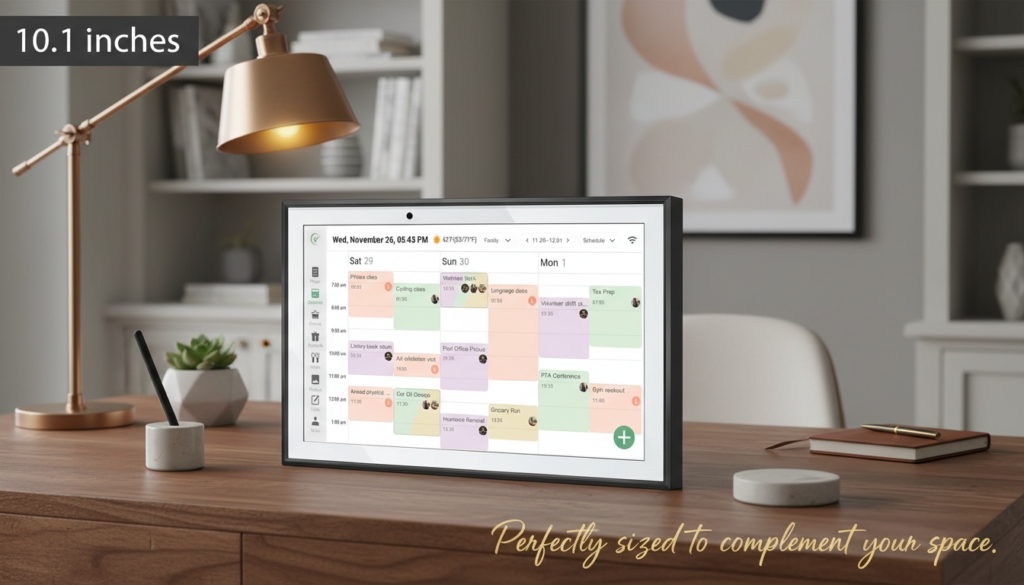
The RROSKY WiFi Digital Calendar features a sleek 10.1-inch touchscreen display housed in an elegant black frame that complements virtually any home décor. The matte finish resists fingerprints better than glossy alternatives, though with frequent family use, you’ll still want to wipe it down weekly. The bezels are slim enough to look modern without being so minimal that the screen feels fragile.
The included desk base is surprisingly sturdy—constructed from weighted plastic that prevents tipping even when enthusiastic children tap the screen. The base allows for both portrait and landscape orientation, though I found landscape mode more practical for viewing weekly schedules at a glance. At just under 2 pounds, the entire unit feels substantial without being cumbersome, and the footprint is compact enough to fit on kitchen counters, entryway consoles, or home office desks without dominating the space.
The display quality impressed me immediately. The 1280×800 resolution delivers crisp text that’s easily readable from across the room—crucial for a family calendar that needs to be checked while rushing through the kitchen. The brightness adjusts automatically based on ambient lighting, though you can manually override this setting. Colors are vibrant enough to make different family members’ schedules visually distinct without being oversaturated.
Performance & Features:
The scheduling functionality of the RROSKY WiFi Digital Calendar goes far beyond what you’d find in a typical skylight digital calendar. You can create separate color-coded calendars for each family member, with the ability to view them individually or in combined overlay mode. This feature alone has saved my family from countless scheduling conflicts.
The touchscreen responds quickly to taps and swipes, with minimal lag even when switching between different views or adding new events. Creating appointments is intuitive—simply tap a time slot, enter details, assign it to a family member, and set reminders. The system supports recurring events (essential for weekly activities like soccer practice or piano lessons), all-day events, and multi-day events.
What sets this digital calendar display for home apart is its smart notification system. You can set customizable reminders that appear on the screen at designated times before events. During my testing, these visual reminders proved far more effective than phone notifications, which family members often dismiss or miss entirely. The calendar can also send notifications to connected smartphones via the companion app, creating a multi-layered reminder system.
The WiFi connectivity enables real-time syncing across devices. When I added an appointment through the mobile app while at work, it appeared on the home display within seconds. This synchronization works with popular calendar services, allowing you to import existing schedules rather than manually re-entering everything.
User-Friendliness:
Setup took approximately 12 minutes from unboxing to having our first week scheduled. The initial configuration wizard walks you through WiFi connection, time zone settings, and creating family member profiles. The interface uses familiar calendar conventions—monthly grid views, weekly schedules, daily agendas—so there’s virtually no learning curve for anyone who’s used a digital calendar before.
My 8-year-old daughter navigated the system independently after a single demonstration, which speaks volumes about its intuitive design. The touchscreen is responsive enough for small fingers but requires deliberate taps, preventing accidental changes when someone brushes against it.
2. Chore Charts That Actually Motivate Kids
The second transformative feature of the RROSKY WiFi Digital Calendar is its integrated chore chart system—something that elevates it beyond standard digital calendar displays.
Performance & Features:
The chore chart functionality allows you to assign tasks to family members with customizable frequencies (daily, weekly, specific days), deadlines, and point values. Each family member gets their own chore dashboard showing pending tasks, completed tasks, and accumulated points.
What makes this system particularly effective is the visual progress tracking. Children can see their completion streaks, which taps into the same psychological reward mechanisms that make video games addictive. My kids are genuinely excited to check off completed chores on the RROSKY WiFi Digital Calendar touchscreen—something I never achieved with paper chore charts or smartphone apps.
The system sends gentle reminders when chores are due, and you can set escalating notifications for overdue tasks. Parents can review and approve completed chores, preventing the “I did it!” claims for half-finished jobs. The approval process takes seconds with simple tap-to-confirm functionality.
Durability & Quality:
After six weeks of enthusiastic use by two children ages 8 and 11, the touchscreen shows no signs of wear. The screen protector (which comes pre-applied) has prevented scratches despite some overly enthusiastic tapping. The software has remained stable with no crashes or freezes, even when multiple family members access different features simultaneously.
3. Achievement Rewards System for Positive Reinforcement
The third way the RROSKY WiFi Digital Calendar organizes your home is through its gamified achievement and rewards system—a feature that works hand-in-hand with the chore charts.
Performance & Features:
You can create custom rewards with point values that children can “purchase” with points earned from completed chores and good behavior. In our household, rewards range from 30 minutes of extra screen time (50 points) to choosing the weekend movie (100 points) to a special outing with a parent (300 points).
The system displays each child’s current point balance prominently, creating healthy motivation. When a child reaches a reward threshold, the RROSKY WiFi Digital Calendar displays a celebration animation—a small touch that generates genuine excitement.
Parents can also award bonus points for exceptional behavior or effort, and deduct points for infractions if you choose to use that approach. The flexibility allows you to adapt the system to your family’s values and parenting style.
Value for Money:
This rewards system alone could justify a significant portion of the RROSKY WiFi Digital Calendar price tag. Standalone chore and reward apps typically charge $5-10 monthly subscriptions. Having this functionality integrated into your family calendar—with no ongoing fees—represents substantial long-term value.
4. AI Meal Planning That Simplifies Dinner Decisions

The fourth organizational superpower of the RROSKY WiFi Digital Calendar is its AI-powered meal planning feature—an unexpected inclusion that has become one of my favorite aspects.
Performance & Features:
The AI meal planning assistant suggests recipes based on your family’s dietary preferences, restrictions, and favorite cuisines. You input basic parameters (number of people, dietary restrictions, cuisine preferences, cooking time available), and the system generates meal suggestions for the week.
What impressed me most is the learning capability. After several weeks of use, the RROSKY WiFi Digital Calendar began suggesting meals that aligned remarkably well with our family’s tastes, having learned from our selections and ratings. The system avoids suggesting the same meals too frequently and can account for ingredients you already have on hand.
Each meal suggestion includes a recipe with step-by-step instructions, ingredient lists, and nutritional information. You can add ingredients directly to an integrated shopping list, which syncs to the mobile app for grocery store reference.
The meal planning integrates with your calendar, allowing you to schedule specific meals for specific days. This integration is brilliant—you can plan quick meals on busy soccer practice nights and more elaborate dinners when you have time. The system sends reminders about meal prep timing and can notify you when you should start defrosting ingredients.
User-Friendliness:
The AI meal planning interface is straightforward, though it took a few sessions to train the system to our preferences. The recipe instructions display clearly on the 10.1-inch screen, and you can keep the screen on in the kitchen while cooking. The touchscreen responds even with slightly damp fingers, though I’d recommend keeping it away from direct cooking splashes.
5. Cloud Photo Display for Staying Connected
The fifth way the RROSKY WiFi Digital Calendar enhances home organization is through its cloud photo integration—transforming it into a digital photo frame during idle periods.
Performance & Features:
You can connect the device to cloud photo services, allowing it to display a rotating slideshow of family photos when not actively being used for scheduling or chore management. This dual functionality means the device doesn’t sit as a blank screen between interactions.
The photo display quality is excellent, with good color reproduction and brightness that makes images look vibrant. You can create custom albums for display, set rotation intervals, and choose transition effects. The RROSKY WiFi Digital Calendar can display photos in both landscape and portrait orientations, automatically adjusting based on the image dimensions.
This feature adds emotional value beyond pure functionality. Seeing family memories throughout the day creates positive associations with the device and encourages family members to engage with it regularly.
Durability & Quality:
The screen’s anti-glare coating ensures photos remain visible even in bright kitchen lighting or near windows. After extended use, the display shows no signs of burn-in or color degradation, suggesting quality components designed for continuous operation.
6. Multi-User Profiles for Personalized Experiences
The sixth organizational advantage of the RROSKY WiFi Digital Calendar is its robust multi-user profile system that personalizes the experience for each family member.
Performance & Features:
Each family member gets a customized profile with their own color-coding, avatar, and personalized dashboard. When someone taps their profile, they see their specific schedule, assigned chores, point balance, and relevant notifications—filtering out the noise of other family members’ activities.
The system supports up to eight user profiles, accommodating even large families. You can designate admin users (typically parents) who have full editing privileges, and standard users (typically children) who can view information and mark chores complete but can’t delete events or modify settings.
The profile system includes privacy settings, allowing teenagers to mark certain calendar events as “private” so details aren’t visible to siblings, while parents retain full visibility. This balance of privacy and oversight works well for families with older children.
User-Friendliness:
Switching between profiles requires a single tap on the user’s avatar—simple enough for even young children. The visual differentiation between profiles (colors, avatars, personalized greetings) makes it immediately clear whose view you’re seeing.
7. Smart Touchscreen Interactive Display for Seamless Family Communication
The seventh and perhaps most underrated way the RROSKY WiFi Digital Calendar organizes your home is by serving as a central communication hub that reduces the constant “Did you know about…?” conversations.
Performance & Features:
Beyond scheduling and chores, the device includes a family message board where members can post notes, reminders, and quick messages. This feature has become surprisingly valuable for leaving notes like “Dentist called to reschedule” or “Pizza money in the envelope” that everyone needs to see.
The touchscreen interface makes adding these messages quick and effortless—faster than texting the family group chat and more reliable since the message remains visible until acknowledged. You can mark messages as urgent (they display with a red border and notification sound) or routine.
The RROSKY WiFi Digital Calendar also includes a countdown timer feature for tracking days until important events—birthdays, vacations, school breaks. These visual countdowns generate excitement and help children understand time passage in a concrete way.
Durability & Quality:
The device feels built to withstand daily family use. The housing is constructed from durable ABS plastic that resists scratches and minor impacts. The desk base has rubber feet that prevent sliding on smooth surfaces, and the unit remains stable even when repeatedly tapped by enthusiastic users.
The power adapter uses a standard connection, and the cable is long enough (6 feet) to provide flexible placement options without requiring proximity to outlets. The device draws minimal power—approximately equivalent to a nightlight—so leaving it on 24/7 doesn’t noticeably impact electricity bills.
After six weeks of continuous operation, the RROSKY WiFi Digital Calendar has required zero maintenance beyond occasional screen cleaning. The software has received one automatic update during this period, which installed seamlessly without user intervention.
Value for Money:
When evaluating the RROSKY WiFi Digital Calendar price against its comprehensive feature set, the value proposition becomes clear. This single device replaces:
- A traditional wall calendar ($15-30)
- A chore chart system ($20-50 or $5-10/month for apps)
- A meal planning subscription ($10-15/month)
- A digital photo frame ($50-150)
- Multiple reminder apps and family coordination tools
The one-time investment eliminates ongoing subscription fees while providing superior functionality to pieced-together solutions. Compared to the best digital calendar for family options like Skylight Calendar (which focuses primarily on scheduling), the RROSKY WiFi Digital Calendar offers significantly more features at a competitive price point.
For families currently spending $15-25 monthly on various organization and meal planning apps, the device pays for itself within several months while providing a more integrated, user-friendly experience.
Pros & Cons of the RROSKY WiFi Digital Calendar
Product Pros & Cons
| Section | Details |
|---|---|
| ✅ Pros |
|
| ❌ Cons |
|
Alternatives & Comparisons
While the RROSKY WiFi Digital Calendar offers impressive functionality, it’s worth considering alternatives to ensure you’re choosing the best digital calendar for family needs.
Skylight Calendar (Primary Alternative)
The Skylight digital calendar is perhaps the most direct competitor, offering a larger 15-inch touchscreen display focused primarily on family scheduling.
Key Differences:
- Screen Size: Skylight offers a larger 15-inch display versus RROSKY’s 10.1 inches
- Feature Set: The RROSKY WiFi Digital Calendar includes chore charts, achievement rewards, and AI meal planning—features absent from Skylight
- Price: Skylight typically costs $50-100 more than the RROSKY option
- Design: Skylight has a more prominent frame designed for wall mounting; RROSKY’s desk base offers more flexible placement
- Focus: Skylight excels at pure calendar functionality with a larger view; RROSKY provides comprehensive family management
Who Should Choose What:
- Choose Skylight if you primarily need a large, visible calendar display and don’t require chore tracking or meal planning features
- Choose the RROSKY WiFi Digital Calendar if you want an all-in-one family organization system with motivational tools for children and meal planning assistance
Google Nest Hub (Alternative Approach)
The Google Nest Hub offers smart display functionality including calendar access, though it’s not specifically designed as a family planner.
Key Differences:
- Primary Purpose: Nest Hub is a smart home control hub that happens to display calendars; RROSKY is purpose-built for family organization
- Voice Control: Nest Hub offers Google Assistant voice commands; RROSKY is touchscreen-only
- Chore Management: The RROSKY WiFi Digital Calendar has dedicated chore and reward features; Nest Hub requires third-party apps
- Price: Nest Hub is often less expensive but requires subscriptions for advanced features
- Specialization: RROSKY provides deeper family organization tools; Nest Hub offers broader smart home integration
Who Should Choose What:
- Choose Nest Hub if you want a multi-purpose smart display for home control, entertainment, and casual calendar viewing
- Choose the RROSKY WiFi Digital Calendar if family organization, chore tracking, and meal planning are your primary needs
Traditional Paper Planning Systems
For families preferring tactile, non-digital solutions, large wall calendars and paper chore charts remain viable alternatives.
Key Differences:
- Cost: Paper systems are significantly less expensive upfront ($20-50 total)
- Flexibility: The RROSKY WiFi Digital Calendar offers instant updates, reminders, and syncing across devices; paper requires manual updates
- Engagement: Digital gamification and rewards prove more motivating for most children than paper stickers
- Longevity: Paper systems require annual replacement; RROSKY is a one-time investment
- Tech Requirements: Paper needs no WiFi or power; RROSKY requires both
Who Should Choose What:
- Choose paper systems if you prefer tangible planning, have budget constraints, or lack reliable WiFi
- Choose the RROSKY WiFi Digital Calendar if you want automated reminders, real-time updates, and integrated family management tools
Frequently Asked Questions About the RROSKY WiFi Digital Calendar
Q1: Does the RROSKY WiFi Digital Calendar work without WiFi?
The device requires WiFi for initial setup and to access most features including calendar syncing, AI meal planning, and cloud photo display. However, once configured, you can view already-loaded calendar events and chore lists during temporary WiFi outages. The RROSKY WiFi Digital Calendar will automatically reconnect and sync when WiFi is restored. For full functionality, reliable internet connectivity is essential.
Q2: Can multiple family members update the calendar from their phones?
Yes! The RROSKY WiFi Digital Calendar includes a companion mobile app (iOS and Android) that allows all family members to add events, update chores, and manage schedules from their smartphones. Changes sync in real-time to the display unit, ensuring everyone sees updates immediately. This multi-device access is one of the key advantages over a traditional skylight digital calendar approach.
Q3: How difficult is it to set up the RROSKY WiFi Digital Calendar?
Setup is straightforward and typically takes 10-15 minutes. After plugging in the device, you’ll connect it to your WiFi network, set your time zone, create family member profiles, and optionally import existing calendar data. The setup wizard guides you through each step with clear instructions. Most users can complete setup without technical assistance. The user manual includes troubleshooting guidance for common connectivity issues.
Q4: Can I customize the chore charts and reward values?
Absolutely! The RROSKY WiFi Digital Calendar offers extensive customization for chores and rewards. You can create custom chore names, assign point values, set frequencies (daily, weekly, specific days), and establish deadlines. Rewards are completely customizable—you define what rewards are available and how many points each costs. This flexibility allows you to align the system with your family’s specific values and parenting approach.
Q5: Does the device require a subscription for the AI meal planning feature?
No subscription is required! Unlike many digital calendar display for home options that charge monthly fees for premium features, the RROSKY WiFi Digital Calendar includes AI meal planning, chore charts, and all features with the one-time purchase price. There are no hidden costs, monthly subscriptions, or premium tiers. This represents significant long-term value compared to meal planning apps that typically charge $10-15 monthly.
Conclusion: Is the RROSKY WiFi Digital Calendar Right for Your Home?
After six weeks of intensive real-world testing, I can confidently say the RROSKY WiFi Digital Calendar delivers on its promise to transform family organization. This isn’t just another digital calendar—it’s a comprehensive family management system that addresses the multiple pain points of modern household coordination.
The device excels in its primary mission: keeping families synchronized and organized. The centralized scheduling eliminates the “I didn’t know about that” excuses, while the chore chart and reward system genuinely motivates children in ways that paper charts and nagging never could. The AI meal planning feature, initially a “nice-to-have” in my mind, has become indispensable for reducing dinner-time stress and decision fatigue.
The RROSKY WiFi Digital Calendar represents excellent value for families seeking to consolidate multiple organization tools into one elegant solution. While the upfront investment exceeds basic calendar options, the comprehensive feature set, lack of subscription fees, and genuine effectiveness justify the price. This is particularly true when you consider the monthly costs of meal planning apps, chore tracking subscriptions, and the mental energy saved by having a centralized family hub.
Who Will Love This Product:
- Busy families struggling with schedule coordination
- Parents seeking to build responsibility and positive habits in children
- Households transitioning to smart home technology
- Anyone experiencing “mental load” from managing family logistics
- Families who value both functionality and motivation in organization tools
Who Might Want Alternatives:
- Single individuals or couples without children (simpler solutions may suffice)
- Families preferring traditional paper planning methods
- Those with unreliable WiFi connectivity
- Budget-conscious households seeking minimal-feature calendar displays
The RROSKY WiFi Digital Calendar has earned a permanent place in my kitchen, and I genuinely believe it can transform your family’s organization as dramatically as it has ours. The combination of scheduling, chore management, meal planning, and motivational features creates a synergy that’s greater than the sum of its parts.
If you’re ready to bring your family organization into the 21st century and reduce the daily chaos of coordinating busy lives, the RROSKY WiFi Digital Calendar is an investment that will pay dividends in reduced stress, improved communication, and more harmonious household management.
Ready to transform your family’s organization? Click here to check the latest price on Amazon and discover why the RROSKY WiFi Digital Calendar is becoming the go-to choice for families who want to organize smarter, not harder. With its comprehensive features, intuitive design, and proven effectiveness, this smart family planner could be the solution you’ve been searching for. Don’t let another chaotic week pass by—see how the RROSKY WiFi Digital Calendar can bring order, motivation, and peace of mind to your home today!
Related posts